Everything I write starts as Markdown. Notes, documentation, these essays, the README for every project on my machine. It is the closest thing I have to a native file format for thinking. So it bothered me, more than it probably should have, that I never found an editor for it I actually liked.
The choices all made me pick two out of three. iA Writer is beautiful and native, but has no vim keybindings and no math. Typora gets the live preview right, but it is an Electron app and closed source. Obsidian is a knowledge system that happens to include an editor, also Electron. And VS Code will of course do everything, the way a cargo ship will technically take you water skiing. Three hundred megabytes of idle memory to render text is a lot of idle memory.
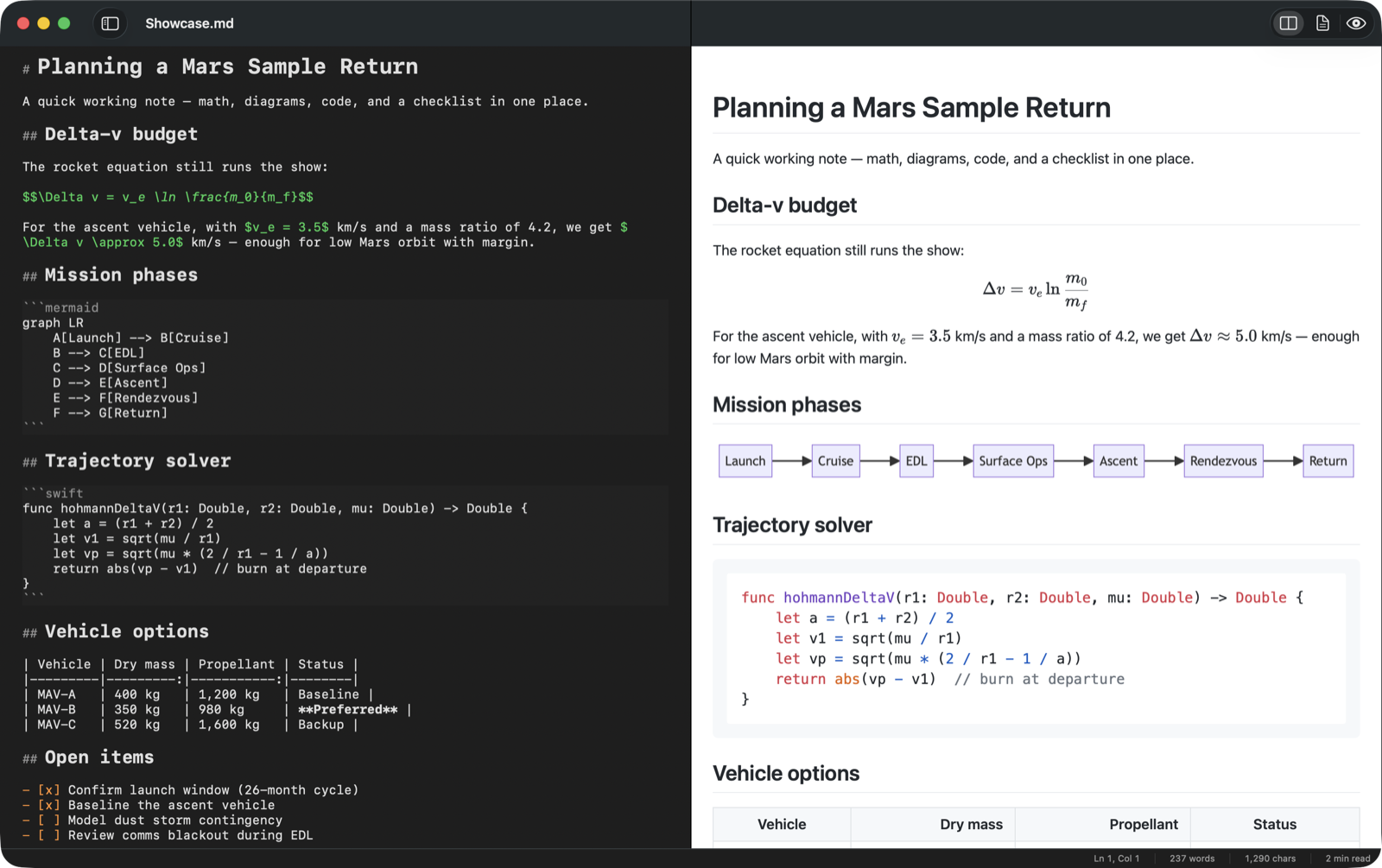
What I wanted fit in a sentence: a real Mac app that thinks like vim, renders like a technical journal, and exports like it works in an office. Nobody sells that. So Claude and I built it.
The press release came first
At work, my team helps product groups start by writing the press release before the product exists. It forces you to say, out loud and in plain language, what the thing is and who it is for, before you have spent anything on building the wrong it. I have run that exercise with a lot of teams. It felt only fair to eat my own cooking.
So sitting in the repo, next to the source, is a PRFAQ - a press release for an app that did not exist yet, and a page of the hard questions with honest answers. Why not just use VS Code? Why is the Word export going to be imperfect in version one? What is out of scope? That document did its job. Live WYSIWYG editing, plugins, sync - all cut on paper, where cuts are free.
Six days
The first commit was February 6. Version 1.0 shipped February 12 - signed, notarized, a proper DMG with an Applications shortcut. Thirty-six commits to date, a bit over six thousand lines of Swift, and 128 tests, nearly all of it written by Claude Code. My contribution was the same as it always is now: notice what is wrong, describe it clearly, and decide whether what came back is worth keeping.
The architecture is a hybrid, for a reason. SwiftUI is lovely for the shell - windows, toolbar, settings, the file sidebar - and genuinely not ready for a serious text editor. Its TextEditor control gives you no syntax highlighting hooks and no real key handling. Underneath, the editor is NSTextView, the AppKit component Apple has been refining for thirty years. New where new is good, old where old is better.
The preview is a WKWebView with KaTeX, Mermaid, and highlight.js bundled inside the app. No CDN, no network calls, ever. The same rendered page powers the PDF export, so what you see is literally what you print.
The parts that were actually hard
Field notes from the interesting failures, because the successes are boring.
Vim is a language, not a list of shortcuts. The naive version is a pile of if-statements on keystrokes. The version that works is a small state machine that parses count, operator, then motion or text object - d2w is a sentence, not three keys. Claude built it as a pure Swift type with no UI dependency, so the tests feed it key sequences and assert on what it decides, no window required. That one design choice is why the vim layer went from "demo" to "daily driver": every bug became a one-line failing test first.
The dollar sign problem. Markdown with LaTeX support treats $...$ as inline math. Then you write a table of vehicle options with $1,200 in one column and $980 in another, and the renderer happily turns the space between two prices into an equation. The fix is a guard that only promotes a single dollar sign to math when the contents actually look like math. Obvious in hindsight. Everything about text processing is obvious in hindsight.
Word export, the honest way. A .docx file is a ZIP archive of XML with very particular bookkeeping. The easy route is shelling out to the system zip tool, and it is wrong for a sandboxed Mac app. So the exporter writes the ZIP format itself, in Swift - local file headers, central directory, the end-of-directory record, the whole 1989 experience. I did not write a byte of it, but I read all of it, and I now know more about ZIP than I ever planned to.
The last ten percent is bug hunting. Before 1.1 I asked Claude to do a full adversarial sweep of its own app: crashes, data loss, vim correctness, export edge cases. It found real bugs, including a sidebar behavior that could have clobbered an open file's association. The tools are good enough now that "review your own work like you are trying to get it rejected" is a prompt that pays for itself.
What it is
MarkdownEditor is a free, open source Mac app. Syntax-highlighted editing, optional vim mode with motions, operators, text objects, and the dot command, live preview in side-by-side or single-pane modes. GitHub-Flavored Markdown with tables, footnotes, and task lists, KaTeX math, Mermaid diagrams, and one-menu export to PDF, HTML, or Word. It launches in well under a second and the download is five megabytes. It needs macOS 14 or later.
The product page is at obercode.com/markdowneditor, and the code and DMG live on GitHub. If you write in Markdown and live on a Mac, I want to know what breaks for you. File an issue, or just tell me.
The newest reason
There is also a reason this tool would not have made the same sense five years ago. Markdown is the language AI speaks. Every file that steers my agents is Markdown - CLAUDE.md, the skills, the plans. Everything they hand back is Markdown too: research reports, PRFAQs, the first draft of this post. Editing Markdown quietly stopped being a writers' niche and became a primary interface for working with AI.
So most days this app is not where I write essays. It is where I update the instructions my agents run on and read what they wrote overnight - rendered like documents, with the tables and diagrams intact, instead of raw source in a code editor. A tool built by an agent, for maintaining the files that drive agents. I did not plan that loop, but I like it.
The loop, at app scale
I have written before that my method is noticing friction, describing it, and deciding what to keep. Most of what it produces is small: a script, a camera alert, a briefing. This was a test of whether the same loop holds for a real product - an app with an icon, an installer, a notarization ticket from Apple, and opinions about typography.
It holds. The cost of "I wish this existed" has fallen to the point where a six-day evening project produces the tool I will write in for years. The scarce thing was never the code. It was knowing exactly what I wanted - and I had twenty years of being annoyed by Markdown editors to draw on.